
When you’re sharing documents meant for your team or internal staff only, a few simple security steps make all the difference. Setting things up properly helps ensure your information stays in the right hands, and prevents accidental sharing outside your organisation.
This guide will show you how to quickly and confidently secure your internal documents so you can collaborate smoothly and safely.
Security Rules
- Single Sign-On
- Provide your viewers with a secure and seamless login experience by protecting your documents with a Single Sign-On (SSO) security rule.
- One of the most secure ways to protect internal documents - it centralises authentication and ensures only verified viewers can access your content.
- No more juggling multiple passwords - employees log in through one trusted system that uses strong security measures like multi-factor authentication.
- Reduce the risk of weak passwords, unauthorised sharing, and forgotten access controls - your viewers have a safer and smoother way to access sensitive information.
- Reader Login
- If you don't have SSO, Reader Login is a good alternative as it authenticates the email address of the viewer, and can lock down a document by email address or domain.
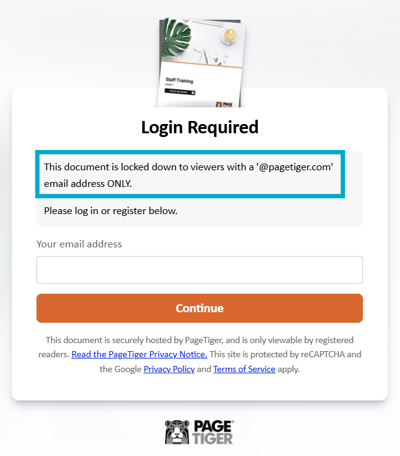
Use the 'Restrict by email address' option to allow access for specific email addresses or email domains (e.g. @pagetiger.com), or set up an Expected Visitor List.
- Other security rules
- Review the options available to choose the level of protection required for your internal documents.
Style Settings
-
Toolbar options
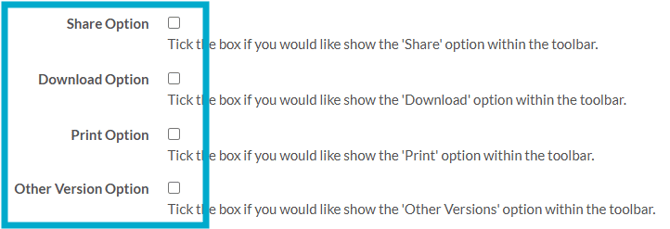
- Untick the following options to ensure they don't appear in the toolbar:
- Share
- Download
- Other Versions
- Untick the following options to ensure they don't appear in the toolbar:
Document/Version Control
-
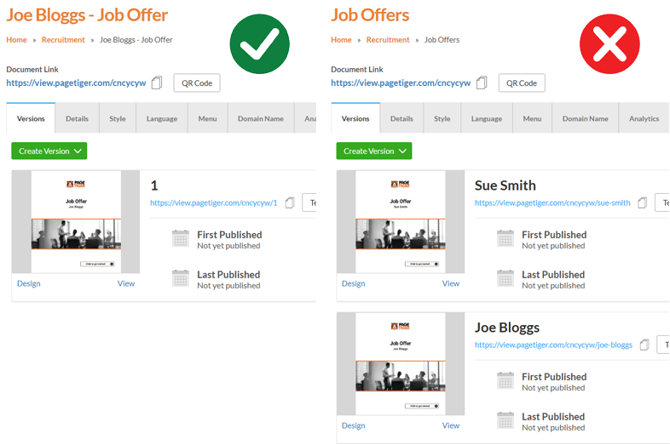
One person > One document
- It's essential to create a new document per person for content intended for a single individual (such as a job offer pack or interview invite).
Additional Tips
Although the below options won’t secure a document, they can still be really useful.
Using clear folder structures, tags and consistent naming conventions will make your internal documents easier to locate, manage and share with the right people.
- Add the word 'Internal' to the Document Name and/or cover page.
