
- PageTiger User Guide
- Managing your account and users
- Account Types, Roles & Permissions
Account Types
Parent account
Allows the creation, security, distribution, and tracking of documents.
The Account Owner has permission to manage users, access subscription details, and share templates and settings with their Child accounts. They also have the ability to impersonate their Child accounts, giving them full access and matching permissions - just as if they were logged in as that user.
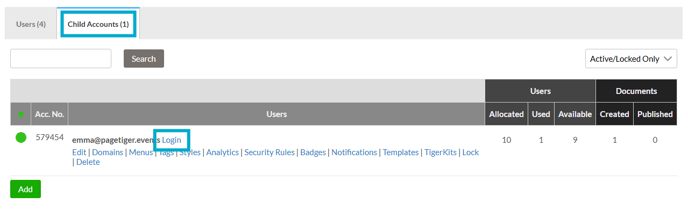
Child account
Sitting beneath a a Parent account, a Child account allows the creation, security, distribution, and tracking of documents, with the added benefit of being able to use the templates and settings shared to them from the Parent account.
Each Child account must have an Account Owner who is responsible for managing users.
Please note: Child account settings take priority over role permissions. For example, if you disable an option such as Menus in the child account settings, it will remain unavailable, even if the user’s assigned role includes that permission.