
- PageTiger User Guide
- Distributing
- HTML based distribution
Image link
Use an Image Link to generate a clickable image for your website. Just copy and paste the code into your site’s source, and the image will direct readers to your document, encouraging them to engage with it.
-
Navigate to a document.
-
Select ‘Manage Version’, followed by ‘Distribute’ for the version.
-
Select ‘Image Link’ from the available options.
A line of html code will be automatically generated that can be added to your website.
Settings
Image Size
Enter the size (in pixels) that you would like the image to be.
Tool Tip
Specify the text that will display if you hover over the image.
Document Options
Specify whether the image link will open the version in a new window or the current window.
Most Recent Version
Tick if you would like the image link to open the most recent version in the document.
Tracking Token
Affix a tracking token, such as an email address, to enrich reports.
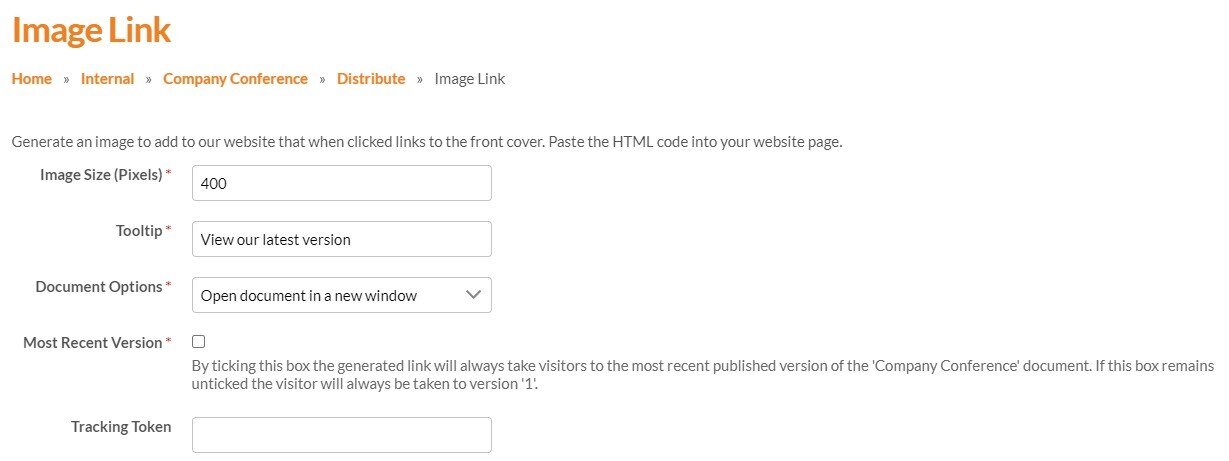
Once you’re happy with your Image Link, click ‘Refresh Preview’ to generate the latest version of the image as it will appear on your website. You can then copy the HTML code and paste it into your site source code.
It’s possible to email the HTML code to an email address of your choice if someone else which can be useful if someone else is actioning the change.