
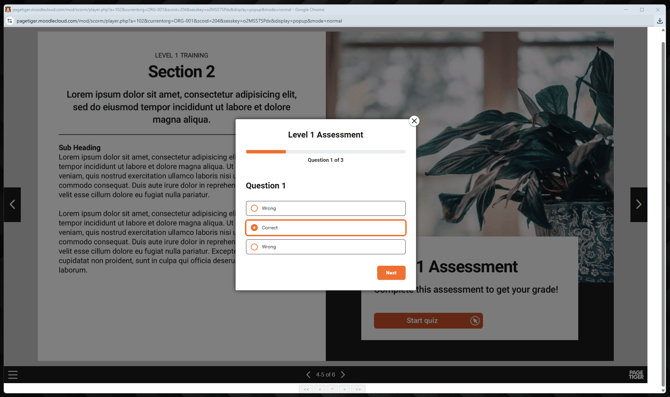
We’re excited to share an upcoming feature that will let you generate a SCORM package directly from your PageTiger document! Soon, you'll be able to upload it as an activity in your LMS course, displaying the document within the course and sending completion data straight back to your LMS.
"Easy for you, smooth for your learners, and fully trackable for your reporting!"
While this feature isn’t live just yet, we’re opening early access to anyone who would like to test it. If you enjoy trying new tools, or want to help shape what comes next, this is your chance!
Why join the SCORM Package beta testing?
- Get early access to the feature
- Share feedback that helps refine the final release
- See how it works in real LMS course setups
Example SCORM files
Below are some example SCORM files that you can download and upload as a new activity in your LMS course to see how everything works. All we ask is that you provide your insights (good or bad!) to help us refine the feature as we prepare for the wider release.
Download a file and upload it to your course as a new activity.
If you're unsure how to do this, please refer to your LMS user guide for guidance, as instructions can vary depending on your platform.
File 1 - page is reached
This test file is set up so that when page 5 is reached, the activity will be marked as complete in your LMS.
| Version | Test File |
| 2004 | Download file |
| 1.2 | Download file |
File 2 - assessment is passed
This test file is set up so that when the assessment is passed (achieving more than 2 out of 3) it will mark the activity as complete in your LMS.
| Version | Test File |
| 2004 | Download file |
| 1.2 | Download file |
The above files will help you run some initial testing - once you’ve had a chance to try them out and everything looks good on your end, just let us know. We’ll then activate the feature in your account so you can start generating files using your own content!
Things to think about:
- Which LMS do you use?
- What worked well for you?
- Did you encounter any challenges along the way?
- Did the completion criteria feed into your LMS?
How to feed back your findings
Please share your feedback with our support team at support@pagetiger.com.
If we have any follow-up questions to help you get the most out of this new feature, we’ll reach out to you directly.
Happy Testing!