
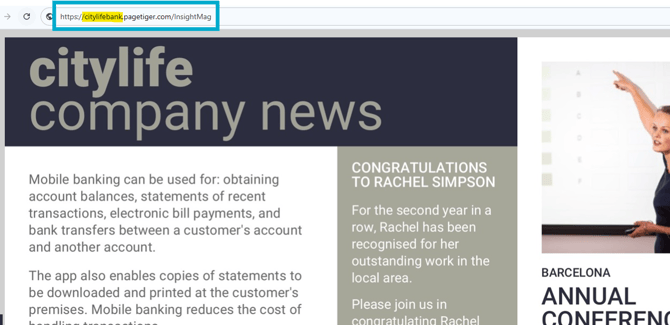
When you sign up to PageTiger, an on-brand sub-domain will be set up for you and applied to your documents by default. It's a great way to reinforce your organisation’s brand by displaying the name in in the document URL.
This not only looks more professional and trustworthy for your audience, but also makes your documents easier to recognise, share and revisit.
FAQS
Q: What is a sub-domain?
A: A sub-domain makes up part of the URL that is used to view the documents in your account.
Q: Will the on-brand sub-domain apply to all versions in my document?
A: Yes! Domain Names are applied at document level, which means they will apply to all versions created within it.
Q: Do I have to use an on-brand sub-domain?
A: Your on-brand sub-domain will be applied to your documents by default, however, you can unselect it on the 'Manage Document' page of a document if preferred. This will change the sub-domain back to 'view' - for example, view.pagetiger.com/employee-manual/1
Q: I would like to create an additional on-brand sub-domain. Is this possible?
A: Yes! Please reach out to your Customer Success Manager who would be happy to discuss this with you.
Q: I have more than one on-brand sub-domain in my account. How do I choose which one to use on my document?
A: Simply navigate to the 'Manage Document' page for your document, select the ‘Domain Name’ tab, and choose which sub-domain you'd like to apply. Don't forget to save!