
Whether you want it displayed directly on the page for instant visibility, or revealed in a pop-up for a more focused viewing experience, placement puts you in control of how people engage with your content.
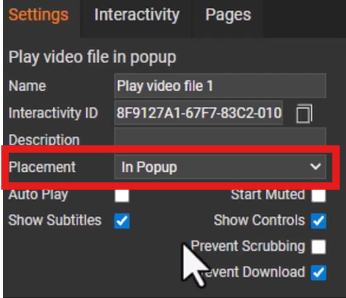
When you select a video module, you'll see the settings on the right hand side of designer.
Here you will see a drop down option that lets you choose exactly how your uploaded video appears on your document. You have two options:
-
On-page - the video is played on page, this can help keep your message front and center, encouraging quick interaction and seamless browsing.
-
Pop-up - the video is played in a pop up box once the reader has clicked on the interactivity. This can minimise distractions and draw full attention to key moments like announcements or staff events.
Once selected, preview your video through 'Page Preview' or 'Version Preview' tab to see how it appears for your readers!