
Available for 'Play video file on page' and 'Play video file in pop-up' modules.
A video thumbnail is a still image that acts as a visual preview of your video - think of it like a book cover. It's the first thing your visitors see before the video plays, so it's a great opportunity to make a strong first impression.
Adding a thumbnail is especially useful if the first frame of your video isn’t ideal or doesn’t clearly represent the content. A well-chosen thumbnail can help draw attention, set expectations, and encourage viewers to hit play.
-
Create a suitable image, ensuring it uses the same dimensions of your video.
-
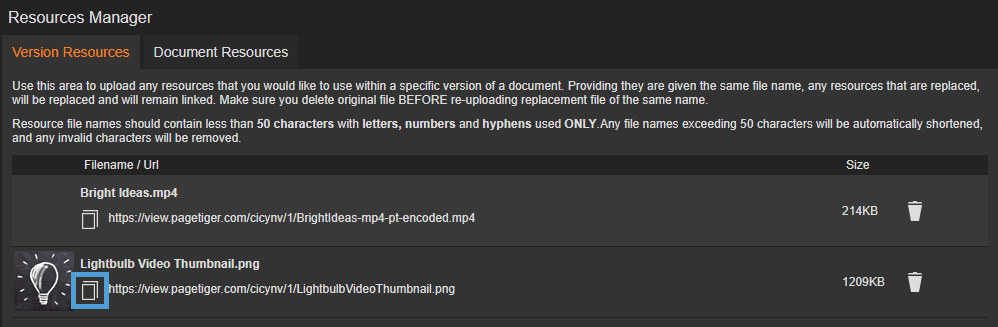
Upload the image to your Resources Manager.
-
Select the copy icon next to the resource to make a copy of the resource URL.
-
Paste the resource URL into notepad - you will need it soon!
-
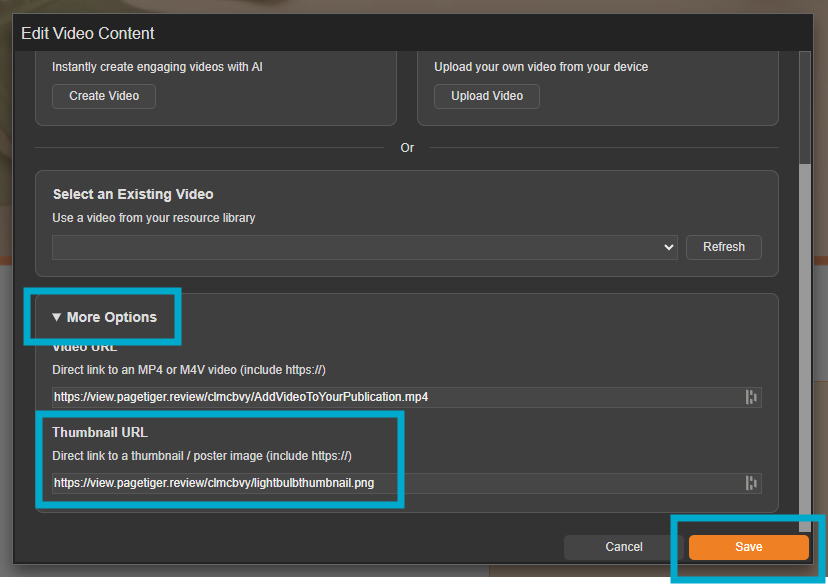
Click and edit the video module, and expand 'More Options'.
-
You can then paste the resource URL into the 'Thumbnail URL' field.
- Select the 'Save' button to save your changes.
- When you next preview or view your document, the thumbnail will display.
