
Easily embed your PageTiger document directly into your webpage, allowing visitors to view it without navigating away. A simple line of HTML code is all that’s required, helping to capture attention and enhance engagement.
-
Navigate to a document.
-
Select ‘Manage Version’, followed by ‘Distribute’ for the version.
- Select ‘Embed in Website’ from the available options.
Settings
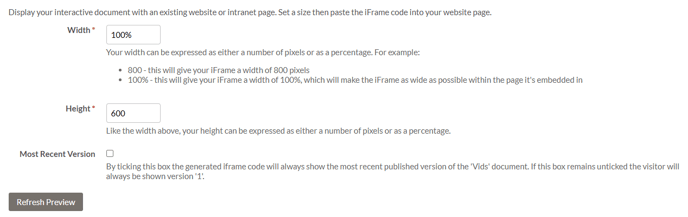
Width and Height Size
Specify the dimensions for how you would like your PageTiger document to appear on your website.
Most Recent Version
Checking this box ensures that the iFrame code will always display the latest published version of the document.
Refresh Preview
Select the ‘Refresh Preview’ button to generate an up-to-date preview of how your document will look once embedded on your website.
Code
Copy the generated HTML code and insert it into your website's source code. Alternatively, enter an email address of your choice into the email code field to send to someone else.

Don't forget to turn on the 'Enable IFrame' option for your document if you would like to share it on a specific website. The option can be found on the 'Details' section of a document and is a simple checkbox.
We're continually working to enhance our security standards and are currently in the process of migrating accounts to include this option. If you don’t see it available on your document but would like to enable it, please reach out to our support team.